Translate any Mac screen region without breaking its layout.

Popup OCR boxes flatten two-column papers, manga panels, and dense software dialogs into an unreadable wall of text. Press F1 in Transeen to freeze any region, read translations rendered right over the original strokes, tap Tab to verify originals, or pin translated cards beside your work.

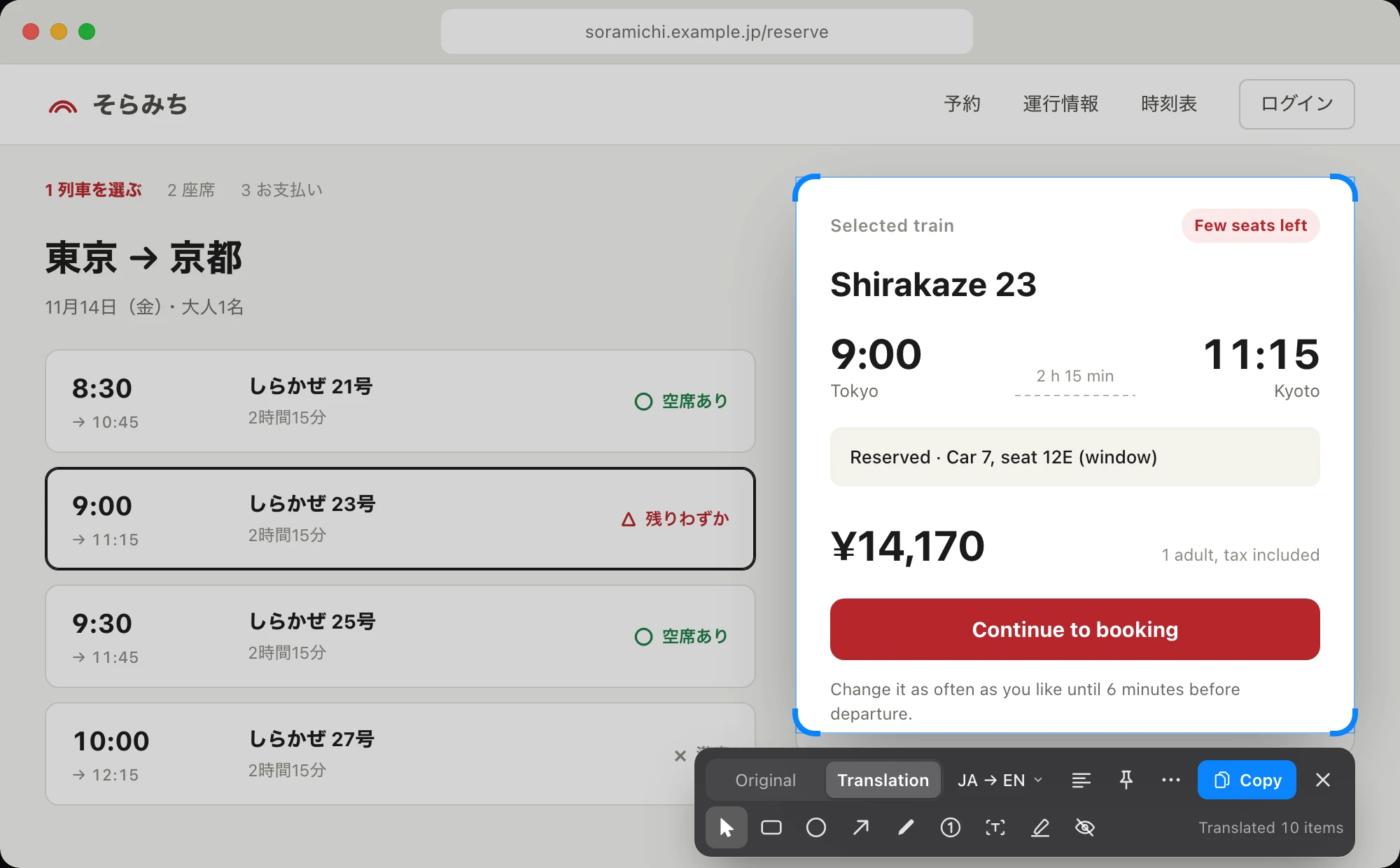
Transeen translating a Japanese interface card into English directly in place on macOS with vector markup controls below
Press F1 in any app or full-screen Space → select a card, chart, or page → read in place and press Tab to toggle original vs. translation.

Where popup OCR translators fall apart — and in-place overlay shines

Whenever meaning depends on spatial position — which label belongs to which axis, speaker bubble, or form input — keeping text in its original coordinates saves minutes of mental mapping.

Academic PDFs & Figures

Two-column papers, scanned tables & diagram callouts

Select across columns, figure legends, or LaTeX-heavy PDFs in Preview or Zotero. Equations and surrounding layout stay anchored; tap Tab to check exact terminology, or Pin to Screen while taking notes.

Raw Manga, Games & Video

Press F1 then R to re-translate the same region

Reading vertical Japanese manga bubbles or untranslated visual-novel / game menus? Press F1 + R to instantly re-capture the exact dialogue box coordinates from your previous frame.

Foreign UIs + Long Captures

30,000px scrolling screenshot & vector redaction

Capture entire scrolling settings pages or changelogs up to 60 megapixels, add numbered arrows (1, 2, 3) or solid redactions on an independent layer, and copy (⌘C) ready to share.

Transeen vs Popup OCR (Bob) vs Browser Extensions vs ChatGPT Screenshots

Browser plugins stop at the Chrome tab border, and dragging screenshots into a chat window breaks focus twenty times an hour.

Comparison of screen and document translation workflows on macOS
Workflow requirement Transeen (F1 In-Place) Popup OCR (Bob / Easydict) Browser Extensions Screenshot → ChatGPT
Preserves spatial layout (PDFs, manga, charts, UIs) Yes — renders translated text in place + 1-key Tab / Space toggle No — dumps stripped plain text into a separate popup box Web DOM & supported HTML PDFs only; breaks on images/canvases No — outputs plain chat markdown disconnected from diagram
Works across native Mac apps, menus & full-screen Spaces Every pixel on screen — Figma, Xcode, Preview, games, open tooltips Yes (text extraction only) Browser tabs only Requires manual capture → switch window → paste → wait
100% offline local translation option Apple Translation + built-in ~1.1 GB local LLMs (Index-Translate 2B / Hy-MT2 1.8B) Requires configuring external APIs or system services Cloud API dependent Cloud only — uploads full screenshot image
Screenshot privacy when using cloud LLM APIs Sends local Vision OCR text only — your screenshot never leaves your Mac Varies by plugin / OCR provider Page content sent to translation endpoint Uploads raw pixel screenshot to cloud servers
Scrolling capture, floating pins & markup All built in — 30,000px scroll stitch, click-through pins, numbered callouts & redaction Separate screenshot utility required (e.g. CleanShot / Xnip) None None
Annual cost $149/yr (¥49/yr) via Transeen Annual — unlocks Transeen paid features Free / BYOK API token fees + separate screenshot app cost Free tier or $60–$120/yr Pro subscriptions $240/yr ($20/mo) chat subscription

Three translation engines — your screenshots never leave this Mac

01 · Default Offline

Apple On-Device Translation

Uses macOS system language packs across Simplified/Traditional Chinese, English, Japanese, Korean, French, Spanish, and German. Streams lines in batches of eight with zero network traffic.

02 · Built-in Local LLM

Index-Translate 2B & Hy-MT2 1.8B

One-click ~1.1 GB download on Apple Silicon. Runs inside Transeen with no account, no Ollama setup, and automatic memory release after 5 idle minutes.

03 · Bring Your Own API

OpenAI-Compatible or Local Ollama

Connect any HTTPS chat/completions endpoint or http://localhost:11434. Apple Vision recognizes text locally first, so only text strings are transmitted — never pixels.

One lightweight menu-bar app for translation, pins & scrolling capture.

Download Transeen (Universal DMG for Apple Silicon & Intel, macOS 26+) and sign in with Transeen Annual ($149/yr · ¥49/yr) — unlocking Transeen. Monthly access is $19/month USD (¥9.9/month CNY), or choose all 7 overseas iTool apps for $199/year USD (¥99/year CNY in China). Tax included.

Frequently asked questions

How is Transeen different from popup OCR translators like Bob or Easydict?

Popup OCR tools extract text into a separate plain-text floating window, stripping away two-column PDF structure, manga speech-bubble positions, table alignments, and UI button labels. Transeen renders each translated block directly over its original coordinates on screen, preserving visual context — and lets you press Tab or Space anytime to flip back to the original.

Does Transeen work on unselectable PDFs, manga, Figma, and full-screen Mac apps?

Yes. Press F1 (or fn+F1 on laptop default keyboards) in Preview, Acrobat, Zotero, manga readers, Figma, games, video players, or any full-screen macOS Space. Transeen reads screen pixels locally with Apple Vision, so selectable DOM text is never required.

Can Transeen run 100% offline without uploading screenshots to an API?

Yes. OCR always runs locally on your Mac. For translation, you can choose Apple on-device Translation (offline once macOS language packs are downloaded) or download a built-in ~1.1 GB local model (Index-Translate 2B or Hy-MT2 1.8B on Apple Silicon). Even if you connect an optional OpenAI-compatible API, Transeen sends only the recognized text strings — never your screenshot.

How does vertical scrolling screenshot work?

Choose Scrolling Capture from the menu bar, drag around a scrollable PDF, chat thread, or settings view, click Start, and scroll down (or enable automatic scrolling via Accessibility). Transeen stitches frames up to 30,000 pixels tall (60 megapixels) at full Retina resolution.

What does Transeen cost and what Mac do I need?

Transeen is a signed, notarized Universal Mac app for Apple Silicon and Intel running macOS 26 or later (MIT-licensed source). Usage is unlocked with the Transeen Membership ($149/year or $19/month USD via Creem; ¥49/year or ¥9.9/month CNY via Alipay), which includes Transeen paid features and works offline for up to 7 days after each sign-in check.

Transeen: ¥49/year · ¥9.9/month · US$149/year · US$19/month